
Web Cache Deception is a security vulnerability that can expose sensitive user data. First discovered in 2017 by Omer Gil, this attack takes advantage of caching misconfigurations. In this guide, we’ll explore how it works, its impact, and how to secure websites against it.
Introduction
Before going into details of Web Cache Deception attacks, let’s take a quick look at the purpose of web caches and how they work.
These days websites are likely to have some caching mechanisms in place for reducing time required to load static files. Basically, this mechanism sits between a user and a web server and stores the files which are requested frequently from web server. Most of the time, these mechanisms are Content Delivery Networks (CDN), which distribute content of web resources across the world through caching and serving it on the closest server to users. This approach is highly effective because it reduces the amount of traffic to the origin web server and allows users to get better website performance via improving loading speed.
This behavior of websites is not necessarily a security issue, since it is designed to store and deliver only static files (style sheets, JavaScript files, images, etc.) which don’t include any user-specific sensitive information. The problem arises when there is a security misconfiguration which leads to a path confusion between web server and caching mechanism (CDN server).
Path confusion simply means that web server and CDN server interprets a requested URL differently which causes a conflict between these servers in determining whether the response of a requested URL can be cached or not. This conflict can be exploited to deceive CDN caching mechanism into storing dynamic responses which may potentially contain sensitive information.
Preconditions
First of all, let’s take a look at what the preconditions for the Web Cache Deception attacks are. Obviously, a target website needs to have a caching mechanism, which can be detected due to specific headers, such as Cache-Control and X-Cache which is a strong indication of caching.
When coming across X-Cache: hit in response headers it denotes that the response is retrieved from a cache, while X-Cache: miss means that the response hasn’t been cached yet and is retrieved from the origin server. Even if there isn’t any header related to caching in a response, it is still recommended to check if a website caches responses manually. It can be done via requesting the same URL on two separate browsers subsequently. If the second browser returns the response which is identical to the first one, it means that caching is in place.
After confirming the existence of caching, the next step is testing for a path confusion. This can be detected via appending arbitrary static files to the end of existing paths of a web application and observing the web server’s reaction to the request.
Let’s assume that the target application has a valid path https://example.com/account.php which displays information about the current user. To identify if there is a path confusion issue, the request similar to the following can be requested: https://example.com/account.php/nonexistent.jpg. Note that, the requested resource doesn’t exist on the server and is only used to detect any misconfigurations related to paths.
If the response to the above request reveals the content of account.php and the CDN caches it, all the prerequisites for a Web Cache Deception attack are fulfilled. In this scenario, the CDN determines the cacheability of the response solely based on the file extension (.css). However, a securely-configured caching server should also evaluate the Content-Type and caching headers returned by the origin server to prevent the vulnerability.
Attack scenario
After confirming necessary conditions for the attack, the target application should be analyzed to identify interesting endpoints which return user-specific details, such as API tokens, session cookies, CSRF tokens, etc.
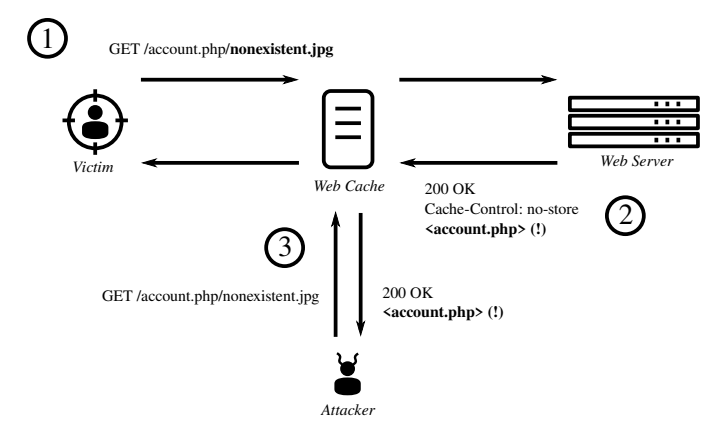
In our last example, it was discovered that CDN server caches the response when sending a request to the endpoint /account.php/nonexistent.jpg. An attacker can send full URL of this endpoint to a victim to obtain their account details. This attack flow is illustrated as follows:
- The victim visits the URL sent by the attacker. Since there is no cache for this resource, the CDN server (Web Cache) forwards the request to the web server.
- The CDN server ignores any caching headers returned from the web server and caches the response as the URL ends with the static file extension (.jpg).
- After the victim’s account page is cached, the attacker requests the same URL and gets the victim’s details in the response.
Source: Cached and Confused: Web Cache Deception in the Wild, Aug 2020, USENIX Security Symposium
Case Study
In one of our recent engagements, we discovered that the target application is vulnerable to a Web Cache Deception attack. It was an e-commerce website and used a /getinfo endpoint to fetch account details from the backend. The web server was configured in such a way that it returned the same response when appending any static file extension to the end of endpoints. For example, it was possible to get account details by requesting the /getinfo.css path. After that, we checked if the response got cached via requesting the same URL on another browser and observed that the same response was returned. Since both of the mentioned conditions were met for Web Cache Deception attacks, we concluded that the target was vulnerable.
A request to the vulnerable endpoint looked like this:
GET /getinfo.css HTTP/1.1
Host: vulnerable-shop.example
Cookie: session=<victim-session>

HTTP/1.1 200 OK
Content-Type: application/json
X-Cache: miss
Cache-Control: no-store

{"user":"alice","email":"alice@example.com","csrf_token":"a1b2c3"}
In order to demonstrate the impact of the attack, we used a CSRF token returned in the /getinfo endpoint. This token could be used to perform CSRF attacks on victims to change their account details and settings using another endpoint /my-account/change-personal-details.
Conclusion
In this blog we looked at key concepts about caching and covered Web Cache Deception attacks in detail. These attacks could be very dangerous, that’s why it is really important to detect them in advance and mitigate security misconfigurations causing vulnerability. The recommendations to prevent these attacks are as follows:
- Make sure that caching is based on the content type and headers returned by the origin server.
- Configure the web server in such a way that it returns a Not Found error when requesting static resources which don’t exist, and rejects requests with unexpected path components.